> For the complete documentation index, see [llms.txt](https://oklencodes.gitbook.io/untitled/llms.txt). Markdown versions of documentation pages are available by appending `.md` to page URLs; this page is available as [Markdown](https://oklencodes.gitbook.io/untitled/ctfs/devoops-ctf/exploiting-web-page.md).

# Exploiting Web Page

<figure><img src="https://2022164620-files.gitbook.io/~/files/v0/b/gitbook-x-prod.appspot.com/o/spaces%2FtzurpgroDJSMn9AFVmQP%2Fuploads%2FXl0QJwQLKikEQzj9G1jw%2Fimage.png?alt=media&amp;token=59156018-e944-4c22-8866-1155451c13c8" alt=""><figcaption></figcaption></figure>

So it wants us to upload the XML elements as, Author – Subject – Content

<figure><img src="https://2022164620-files.gitbook.io/~/files/v0/b/gitbook-x-prod.appspot.com/o/spaces%2FtzurpgroDJSMn9AFVmQP%2Fuploads%2F6ZWqCcg8LqYs0WCtyue3%2Fimage.png?alt=media&amp;token=006dc9de-c725-44c5-88c1-6e08547e79e3" alt=""><figcaption></figcaption></figure>

Writing the test XML to see if it will work

<figure><img src="https://2022164620-files.gitbook.io/~/files/v0/b/gitbook-x-prod.appspot.com/o/spaces%2FtzurpgroDJSMn9AFVmQP%2Fuploads%2FduYVjfEosGfawJ9YKnMd%2Fimage.png?alt=media&amp;token=a1f47a6d-c26d-40a3-a75f-f8661380a1f5" alt=""><figcaption></figcaption></figure>

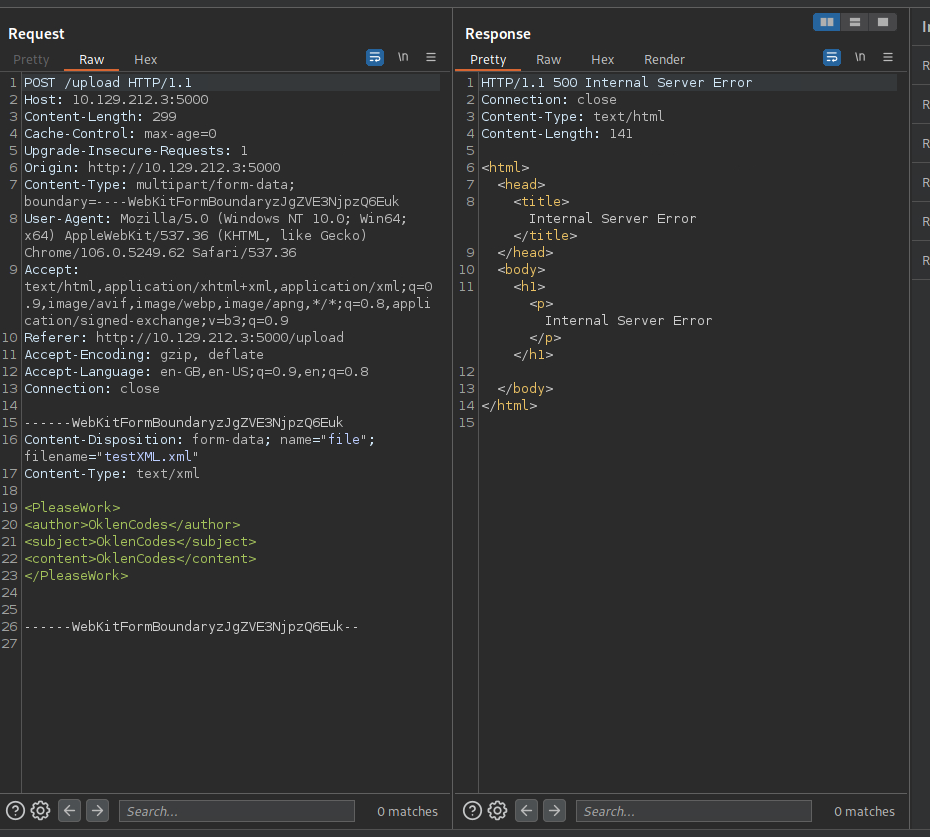
Using burpsuite to see the results. Immediately I noticed even though I wrote the file in txt, the site only wants it in XML

So I change the filename and the context type within burpsuite – to “.xml” and “text/xml”

![](https://2022164620-files.gitbook.io/~/files/v0/b/gitbook-x-prod.appspot.com/o/spaces%2FtzurpgroDJSMn9AFVmQP%2Fuploads%2FDe9aF4H5Ya9comxg1s07%2Fimage.png?alt=media\&token=25bc2a1c-aa7a-4557-9d21-d0cc9c9392fd)\
\
Now with those changes, the response I get from the website is “internal server error”

<figure><img src="https://2022164620-files.gitbook.io/~/files/v0/b/gitbook-x-prod.appspot.com/o/spaces%2FtzurpgroDJSMn9AFVmQP%2Fuploads%2FRPZ2JUeGozr3GguyiEHR%2Fimage.png?alt=media&amp;token=7c9b3d0d-41ff-4e3a-bce9-04422d37b392" alt=""><figcaption></figcaption></figure>

I try again but this time I put Author, Subject, Content in caps

<figure><img src="https://2022164620-files.gitbook.io/~/files/v0/b/gitbook-x-prod.appspot.com/o/spaces%2FtzurpgroDJSMn9AFVmQP%2Fuploads%2Fc4rtPzxKE2cOiLNVe61l%2Fimage.png?alt=media&amp;token=b060f97d-308d-4e4b-8cee-2c8c38596d8f" alt=""><figcaption></figcaption></figure>

Ok so knowing it accepts XML fine. I need to find a XXE injection template. I use the one

<https://github.com/swisskyrepo/PayloadsAllTheThings/tree/master/XXE%20Injection/Files>

Then I put my previous XML strings into it like so -

![](https://2022164620-files.gitbook.io/~/files/v0/b/gitbook-x-prod.appspot.com/o/spaces%2FtzurpgroDJSMn9AFVmQP%2Fuploads%2FRRKJJdR9sCKARd1ByLIM%2Fimage.png?alt=media\&token=e4f50f39-cc01-4ae1-befb-08f8c98c10fd)<br>

had to remove the “#” from Any as I think it was blocking it. Added numbers at the end of author and content to specify they are different lines.

Line 22 was using a system call to grab the contents of [file:/etc/passwd](file:///etc/passwd) and assign it into the variable file. Then we called that variable “file” in line 25

And it worked, once I sent that, I was greeted with a different response.

<figure><img src="https://2022164620-files.gitbook.io/~/files/v0/b/gitbook-x-prod.appspot.com/o/spaces%2FtzurpgroDJSMn9AFVmQP%2Fuploads%2FPLVmPmtQs4Uy7a2go6Ga%2Fimage.png?alt=media&amp;token=20ac2133-f610-4b51-8b95-f76758ca2908" alt=""><figcaption></figcaption></figure>